To ensure Blue Border functions seamlessly, it is important to configure antivirus and security software to exclude specific file paths, executables, and processes. Without these exclusions, third-party security tools may interfere with Blue Border, causing performance issues, application errors, or restricted functionality.
This guide provides detailed instructions for setting up general exclusions on Windows and Mac systems, as well as product-specific guidance.
General Guidance
We recommend excluding the listed directories from scans performed by third-party security products. If a product does not support exclusions at the directory level, exclusions should instead be created for each of the executables listed.
Windows
Real time scan exclusions
We recommend excluding the top-most directory listed below, as well as our installed drivers. This ensures that the exclusions remain in place and are not impacted by any updates to Blue Border. Keep in mind, your antivirus/EDR product may have a different syntax for exclusions and your users may have Windows installed on a drive other than C:\. It is important that subfolders are included in the exclusions.
C:\Program Files (x86)\Workplace\
C:\ProgramData\Workplace\Content\*.data
%windir%\System32\drivers\WorkplaceContainerDriver.sys
%windir%\System32\drivers\WorkplaceGatewayDriver.sys
%windir%\System32\drivers\WorkplaceContainerAKLFilter.sys
%windir%\System32\drivers\WorkplaceContainerSPD.sys
%windir%\System32\drivers\WorkplaceContainerAOD.sys
%windir%\System32\drivers\DumpWorkplaceContainerCDF.sys
Advanced exclusions for Windows
-
If your product does not support directory level exclusions, you can add the following file exclusions for real-time scans to your antivirus product. Keep in mind, your antivirus/EDR product may have a different syntax for exclusions and your users may have Windows installed on a drive other than C:\
WARNING: We strongly advise not to create exclusions based on specific paths. Doing so will require that you stay up to date on any changes made via updates to Blue Border and check this document regularly.Here is the list of exclusions to implement:
C:\Program Files (x86)\Workplace\Components\WorkplaceContainerComponent\Current\Workplace Container Helper.exe
C:\Program Files (x86)\Workplace\Components\WorkplaceContainerComponent\Current\Workplace Badge.exe
C:\Program Files (x86)\Workplace\Components\WorkplaceContainerComponent\Current\Workplace Container.exe
C:\Program Files (x86)\Workplace\Components\WorkplaceContainerComponent\Current\Workplace.Proxy\Workplace Proxy.exe
C:\Program Files (x86)\Workplace\Components\WorkplaceContainerComponent\Current\Workplace Starter.exe
C:\Program Files (x86)\Workplace\Current\Workplace Update.exe
C:\Program Files (x86)\Workplace\Current\Workplace.CertificateInstaller.exe
C:\Program Files (x86)\Workplace\Workplace.exe
C:\Program Files (x86)\Workplace\Current\Workplace.exe
C:\Program Files (x86)\Workplace\Current\Workplace.ReadyBlueLauncher.exe
C:\Program Files (x86)\Workplace\Current\Workplace.ReadyBlueTest.exe
C:\Program Files (x86)\Workplace\WorkplaceDiagnostics.exe
C:\Program Files (x86)\Workplace\Current\WorkplaceBrowserHelper.exe
C:\Program Files (x86)\Workplace\Current\vennget.exe
C:\Program Files (x86)\Workplace\Current\VennGet\vennget.exe
C:\Program Files (x86)\Workplace\Current\Net8Executor\Net8Executor.exe
C:\Program Files (x86)\Workplace\Current\wa_3rd_party_host_32.exe
C:\Windows\System32\drivers\WorkplaceContainerDriver.sys
C:\Windows\System32\drivers\WorkplaceGatewayDriver.sys
C:\Windows\System32\drivers\WorkplaceContainerAKLFilter.sys
C:\Windows\System32\drivers\WorkplaceContainerSPD.sys
C:\Windows\System32\drivers\WorkplaceContainerAOD.sys
C:\Windows\System32\drivers\DumpWorkplaceContainerCDF.sys
C:\ProgramData\Workplace\Content\*.data
Mac
Real time scanning exclusions
We recommend excluding the top-most directory listed below. This ensures that the exclusions remain in place and are not impacted by any updates to Blue Border.
/Library/Application Support/Workplace/
/Applications/Workplace.app
/Applications/Workplace Container.app
/Library/PrivilegedHelperTools/com.os33.update.helper
/Applications/Workplace Gateway.app/Contents/Library/SystemExtensions/com.os33.mac.container.network.extension.systemextension/
/Library/Application Support/Workplace/workplace_.app/Contents/PlugIns/Workplace.Mac.FileProvider.Extension.appex
Executable real time scan exclusions
Exclusions based on executable should be used only if the product does not support directory level exclusions.
DeviceCompliance.app
OS33.Mac.ChromeMessagingHost.app
Workplace.app
Workplace Container.app
Workplace Badge.app
Workplace Clipboard Manager.app
Workplace Clipboard Manager Helper.app
Workplace Container Manager.app
WorkplaceDiagnostics.app
Workplace Endpoint Security Manager.app
Workplace Gateway Manager.app
WorkplaceHelper.app
Workplace Proxy
Workplace.ReadyBlueTest.app
WorkplaceUpdate.app
Workplace Web Launcher.app
Workplace Keychain Helper.app
Mac detailed directory exclusions
/Applications/Workplace.app
/Applications/Workplace Container.app
/Applications/Workplace Gateway.app
/Library/Application Support/Workplace/Workplace Container.app
/Library/Application Support/Workplace/workplace_.app
/Library/Application Support/Workplace/SafariExtension/Workplace.app
/Library/PrivilegedHelperTools/com.os33.update.helper
/Library/Application Support/Workplace/Workplace Container.app/Contents/Resources/Workplace Endpoint Security Manager.app
/Library/Application Support/Workplace/Workplace Container.app/Contents/Resources/Workplace Badge.app
/Library/Application Support/Workplace/Workplace Container.app/Contents/Resources/Workplace Clipboard Manager.app
/Library/Application Support/Workplace/Workplace Container.app/Contents/Resources/Workplace Clipboard Manager.app/Contents/Resources/Workplace Clipboard Manager Helper.app
/Library/Application Support/Workplace/Workplace Container.app/Contents/Resources/Workplace Container Manager.app
/Library/Application Support/Workplace/Workplace Container.app/Contents/Resources/Workplace Gateway Manager.app
/Library/Application Support/Workplace/Workplace Container.app/Contents/Resources/Workplace Proxy
/Library/Application Support/Workplace/Workplace Container.app/Contents/Resources/Workplace Web Launcher.app
/Library/Application Support/Workplace/Workplace Container.app/Contents/Resources/Workplace Keychain Helper.app
/Applications/Workplace.app/Contents/Library/LoginItems/WorkplaceUpdate.app
/Applications/Workplace.app/Contents/Library/LoginItems/WorkplaceHelper.app
/Applications/Workplace.app/Contents/Library/ReadyBlue/Workplace.ReadyBlueTest.app
/Applications/Workplace.app/Contents/Library/Messaging/OS33.Mac.ChromeMessagingHost.app
/Applications/Workplace.app/Contents/Library/Diagnostics/WorkplaceDiagnostics.app
/Applications/Workplace.app/Contents/Library/Diagnostics/non-ui/WorkplaceDiagnostics.app
/Applications/Workplace.app/Contents/Library/Compliance/DeviceCompliance.app
/Applications/Workplace Gateway.app/Contents/Library/SystemExtensions/com.os33.mac.container.network.extension.systemextension/
/Library/Application Support/Workplace/workplace_.app/Contents/PlugIns/Workplace.Mac.FileProvider.Extension.appex
Product Specific Guidance
Sophos
We recommend making the real time scan exclusions below for Sophos.
Real time scan exclusions
When adding exclusions for directories the exclusion type should be set to Real time only. Make sure your exclusions include all subfolders.
C:\Program Files (x86)\Workplace\
%windir%\System32\drivers\WorkplaceContainerDriver.sys
%windir%\System32\drivers\WorkplaceGatewayDriver.sys
%windir%\System32\drivers\WorkplaceContainerAKLFilter.sys
%windir%\System32\drivers\WorkplaceContainerSPD.sys
%windir%\System32\drivers\WorkplaceContainerAOD.sys
%windir%\System32\drivers\DumpWorkplaceContainerCDF.sys
C:\ProgramData\Workplace\Content\*.data
SentinelOne
For SentinelOne, we recommend making the following exclusions:
Real time scan exclusions
When adding exclusions for directories the exclusion type should be set to Interoperability. Make sure to include all subfolders when adding exclusions.
\ at the end of each entry. Without it, sub-directories will not be excluded, leading to performance issues.*\Program Files (x86)\Workplace\
*\Windows\System32\drivers\WorkplaceContainerDriver.sys
*\Windows\System32\drivers\WorkplaceGatewayDriver.sys
*\Windows\System32\drivers\WorkplaceContainerAKLFilter.sys
*\Windows\System32\drivers\WorkplaceContainerSPD.sys
*\Windows\System32\drivers\WorkplaceContainerAOD.sys
*\Windows\System32\drivers\DumpWorkplaceContainerCDF.sys
*\ProgramData\Workplace\Content\*.data
Legacy UI
New UI
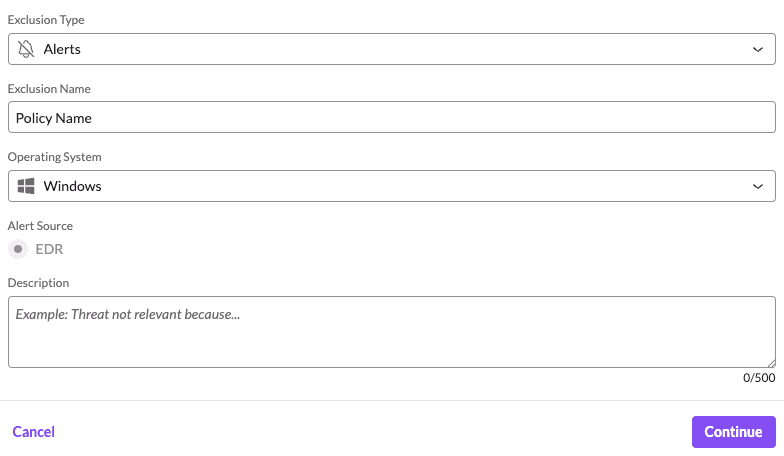
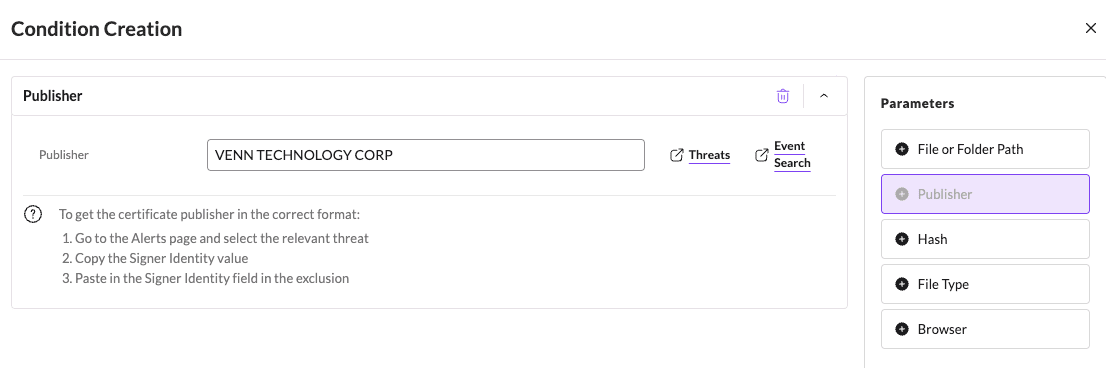
Trust Venn Technology Corp Publisher
When adding exclusions for Publisher the exclusion type should be set to Alerts.
VENN TECHNOLOGY CORP
Comments
0 comments
Article is closed for comments.